Human-in-the-Loop Pattern
Enable agents to wait indefinitely for human approval without losing context, using Temporal signals and child workflows.
Why Human-in-the-Loop?
Agents often need human approval before taking high-stakes actions like financial transactions, legal document signing, or compliance-sensitive decisions. Traditional approaches fail because waiting blocks the agent, system crashes lose context, and interrupted workflows can't resume.
Temporal's signals and child workflows solve this by enabling agents to wait indefinitely without consuming resources. If the system crashes, the workflow resumes exactly where it left off with full context preserved.
Without Temporal:
- Agent blocks resources while waiting for approval
- System crashes lose approval context entirely
- Must restart the entire process after interruption
- Can't handle multi-day approval workflows
With Temporal:
- Agent waits without consuming resources
- System crashes don't matter - workflow resumes automatically
- Full context preserved indefinitely (hours, days, or weeks)
- Approval state is durable and survives any failure
Real-World Applications
Common approval workflows that benefit from this pattern:
- Financial transactions - Manager approval before wire transfer execution
- Fraud holds - Agent pauses suspicious activity, waits for security team review
- Contract execution - Legal team signs off before document is finalized
- Data access - Compliance approval before granting sensitive information
- Procurement - Multi-stage approvals (manager → director → CFO) for large purchases
- Treatment plans - Doctor authorization before prescription fulfillment
The Pattern
Step 1: Create the Confirmation Tool
The key technique here is using child workflows - independent workflows spawned by a parent that inherit all of Temporal's durability guarantees. This allows the approval process to run as a separate, long-running workflow that can wait indefinitely without blocking the parent.
Use child workflows when you need long-running sub-processes like approvals, parallel operations, or any workflow that needs to outlive a single operation. Learn more about Temporal child workflows.
# tools.py
from agents import function_tool
from temporalio import workflow
from temporalio.workflow import ParentClosePolicy
from project.child_workflow import ApprovalWorkflow
from agentex.lib.environment_variables import EnvironmentVariables

environment_variables = EnvironmentVariables.refresh()

@function_tool
async def wait_for_confirmation(action: str) -> str:
    """Wait for human approval before proceeding"""

    result = await workflow.execute_child_workflow(
        ApprovalWorkflow.run,
        environment_variables.WORKFLOW_NAME + "_approval",
        id=f"approval-{workflow.uuid4()}",
        parent_close_policy=ParentClosePolicy.TERMINATE,
    )

    return result
Step 2: Create Child Workflow for Approval
The child workflow uses signals - a Temporal technique that lets external systems send messages to running workflows. Think of signals as secure, durable event triggers that can wake up a waiting workflow from anywhere (CLI, API, webhook, etc.).
Use signals when you need external systems to communicate with long-running workflows, like user approvals, webhook notifications, or live data feeds. Learn more about Temporal signals.
# child_workflow.py
import asyncio
from temporalio import workflow
from agentex.lib.utils.logging import make_logger
from agentex.lib.environment_variables import EnvironmentVariables

environment_variables = EnvironmentVariables.refresh()
logger = make_logger(__name__)

@workflow.defn(name=environment_variables.WORKFLOW_NAME + "_approval")
class ApprovalWorkflow:
    def __init__(self):
        self._approval_queue: asyncio.Queue[bool] = asyncio.Queue()

    @workflow.run
    async def run(self, action: str) -> str:
        logger.info(f"Waiting for approval: {action}")

        # Wait until signal received
        await workflow.wait_condition(
            lambda: not self._approval_queue.empty()
        )

        # Approval received
        approved = await self._approval_queue.get()
        return "Approved" if approved else "Rejected"

    @workflow.signal
    async def approve(self, approved: bool) -> None:
        """Signal to approve or reject"""
        await self._approval_queue.put(approved)
Step 3: Use in Your Agent
# workflow.py
from agents import Agent, Runner
from project.tools import wait_for_confirmation

approval_agent = Agent(
    name="Approval Agent",
    instructions="When asked to perform an action, use wait_for_confirmation to get human approval first.",
    tools=[wait_for_confirmation],
)

result = await Runner.run(approval_agent, params.event.content.content)
Step 4: Trigger Approval
Send the signal when human approves:
# Via Temporal CLI
temporal workflow signal \
  --workflow-id="approval-workflow-id" \
  --name="approve" \
  --input=true
Or programmatically:
# Via Temporal client
from temporalio.client import Client

client = await Client.connect("localhost:7233")
handle = client.get_workflow_handle("approval-workflow-id")
await handle.signal("approve", True)
Why This Works
Durable Waiting
Without Temporal:
- Agent blocks resources while waiting
- If system crashes, approval context is lost
- Have to restart the entire process
With Temporal:
- Agent waits without consuming resources
- System crashes don't matter - workflow resumes
- Full context preserved indefinitely
- Can wait hours, days, or weeks
Workflow Visualization
Parent workflow spawns child for approval:
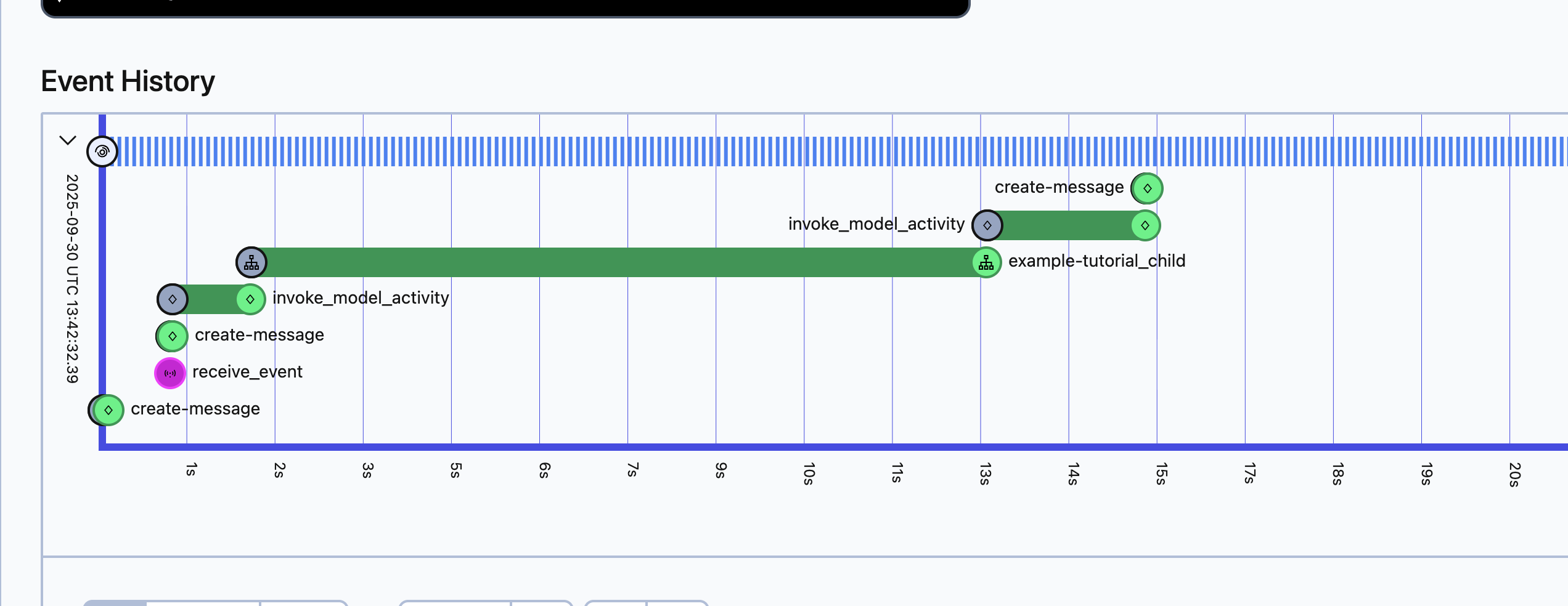
The parent workflow waits for the child to complete, which happens when the signal is received.
Child workflow waits for signal:
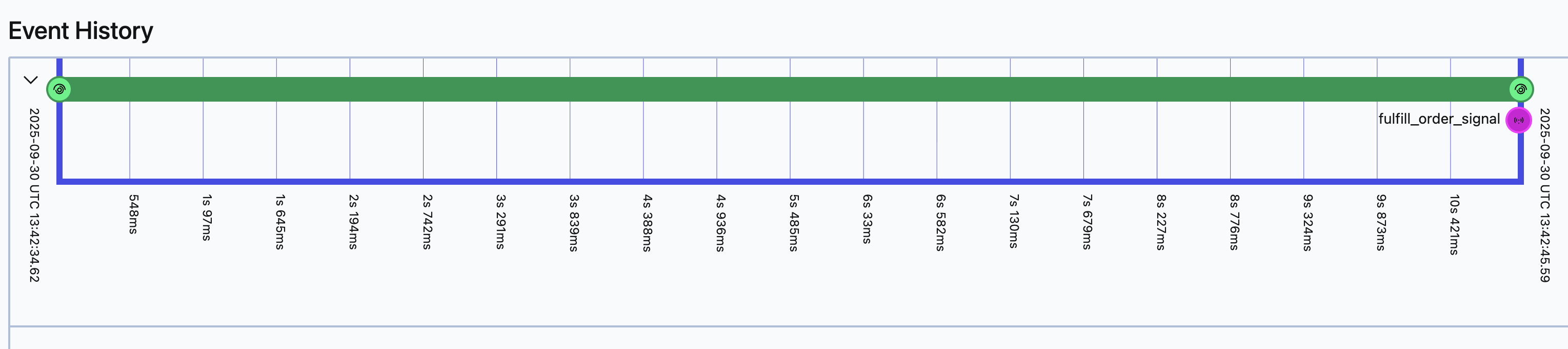
The child workflow runs until the approve signal is triggered, then completes.