OpenAI Agents SDK + Temporal Integration
Learn how to integrate the OpenAI Agents SDK with Temporal workflows in Agentex to build durable, production-grade agents.
Temporal Required
This guide is only for using the OpenAI Agents SDK integration with Temporal ACP. This integration uses Temporal's durability features to make OpenAI SDK calls reliable. The OpenAI Agents SDK is compatible with all other ACP types as well, but without durable execution.
Why OpenAI SDK + Temporal?
OpenAI Agents SDK makes building agents simple - focus on what your agent does, not the infrastructure.
Temporal provides durability and fault tolerance - agents survive failures and resume exactly where they left off.
Together: You get simple agent development with production-grade reliability. LLM calls, tool executions, and state are all automatically durable.
The Value
Without Temporal + Streaming:
- Agent crashes = lost context and state
- Users wait 10-30 seconds for complete responses
- No visibility into agent's thinking process
With Temporal + Streaming:
- Agent resumes exactly where it stopped, maintaining full conversation context and state
- Users see tokens as they're generated in real-time
- Complete visibility into tool calls, reasoning, and agent actions
- Production-grade reliability with automatic retries
Key Innovation: Using Temporal's interceptor pattern, we achieve real-time streaming without forking any components - the standard OpenAI Agents plugin works seamlessly with streaming!
Learn more: OpenAI Agents SDK | Temporal Python
Setup & Configuration
Prerequisites
# Create a new Temporal agent
agentex init

# Choose 'temporal' when prompted
# Navigate to your project
cd your-project-name
Add the OpenAI Plugin with Streaming Support
Step 1: Configure ACP (acp.py):
from agentex.lib.sdk.fastacp.fastacp import FastACP
from agentex.lib.types.fastacp import TemporalACPConfig
import os

acp = FastACP.create(
    acp_type="async",
    config=TemporalACPConfig(
        type="temporal",
        temporal_address=os.getenv("TEMPORAL_ADDRESS", "localhost:7233"),
    )
)
Step 2: Configure Worker (run_worker.py) with Streaming:
from temporalio.contrib.openai_agents import OpenAIAgentsPlugin
from agentex.lib.core.temporal.workers.worker import AgentexWorker
from agentex.lib.core.temporal.plugins.openai_agents.interceptors.context_interceptor import ContextInterceptor
from agentex.lib.core.temporal.plugins.openai_agents.models.temporal_streaming_model import TemporalStreamingModelProvider

# ============================================================================
# STREAMING SETUP: Interceptor + Model Provider
# ============================================================================
# Two key components enable real-time streaming while maintaining Temporal durability:
#
# 1. ContextInterceptor
#    - Threads task_id through activity headers using Temporal's interceptor pattern
#    - Outbound: Reads _task_id from workflow instance, injects into activity headers
#    - Inbound: Extracts task_id from headers, sets streaming_task_id ContextVar
#    - Enables runtime context without forking the Temporal plugin!
#
# 2. TemporalStreamingModelProvider
#    - Returns StreamingModel instances that read task_id from ContextVar
#    - StreamingModel.get_response() streams tokens to Redis in real-time
#    - Still returns complete response to Temporal for determinism/replay safety
#    - Uses AgentEx ADK streaming infrastructure (Redis XADD to stream:{task_id})
#
# Together, these enable real-time LLM streaming while maintaining Temporal's
# durability guarantees. No forked components - uses STANDARD OpenAIAgentsPlugin!

context_interceptor = ContextInterceptor()
temporal_streaming_model_provider = TemporalStreamingModelProvider()

# IMPORTANT: We use the STANDARD temporalio.contrib.openai_agents.OpenAIAgentsPlugin
# No forking needed! The interceptor + model provider handle all streaming logic.
worker = AgentexWorker(
    task_queue=task_queue_name,
    plugins=[OpenAIAgentsPlugin(model_provider=temporal_streaming_model_provider)],
    interceptors=[context_interceptor]
)
Step 3: Add OpenAI API Key
For production deployments, configure the API key in your manifest:
# In manifest.yaml
agent:
  credentials:
    - env_var_name: "OPENAI_API_KEY"
      secret_name: "openai-secret"
      secret_key: "api-key"
Local Development
For local development, create a .env file at the same level as your manifest.yaml to load your environment variables:
# .env
OPENAI_API_KEY=sk-your-api-key-here
The .env file will be automatically loaded when you run agentex run locally.
That's it! The plugin automatically handles activity creation for all OpenAI SDK calls.
How Streaming Works: Interceptors + Context Variables
The new streaming implementation uses Temporal's interceptor pattern to enable real-time token streaming while maintaining workflow determinism. Here's how task_id flows through the system:
Hello World Example
Basic Agent Response
# workflow.py
from agents import Agent, Runner
from agentex import adk
from agentex.lib.types.acp import SendEventParams
from agentex.lib.core.temporal.types.workflow import SignalName
from agentex.types.text_content import TextContent
from temporalio import workflow

@workflow.defn
class ExampleWorkflow:
    def __init__(self):
        self._task_id = None
        self._trace_id = None
        self._parent_span_id = None

    @workflow.signal(name=SignalName.RECEIVE_EVENT)
    async def on_task_event_send(self, params: SendEventParams) -> None:
        # Echo user message
        await adk.messages.create(task_id=params.task.id, content=params.event.content)

        # Create OpenAI agent
        agent = Agent(
            name="Haiku Assistant",
            instructions="You are a friendly assistant who always responds in the form of a haiku.",
        )

        # ============================================================================
        # STREAMING SETUP: Store task_id for the Interceptor
        # ============================================================================
        # These instance variables are read by StreamingWorkflowOutboundInterceptor
        # which injects them into activity headers. This enables streaming without
        # forking the Temporal plugin!
        #
        # How it works:
        # 1. We store task_id in workflow instance variable (here)
        # 2. StreamingWorkflowOutboundInterceptor reads it via workflow.instance()
        # 3. Interceptor injects task_id into activity headers
        # 4. StreamingActivityInboundInterceptor extracts from headers
        # 5. Sets streaming_task_id ContextVar inside the activity
        # 6. StreamingModel reads from ContextVar and streams to Redis
        self._task_id = params.task.id
        self._trace_id = params.task.id
        self._parent_span_id = params.task.id

        # Run the agent - no need to wrap in activity!
        # The interceptor handles task_id threading automatically
        result = await Runner.run(agent, params.event.content.content)

        # Send response
        await adk.messages.create(
            task_id=params.task.id,
            content=TextContent(
                author="agent",
                content=result.final_output,
            ),
        )
Why No Activity Wrapper?
The OpenAI SDK plugin automatically wraps Runner.run() calls in Temporal activities. You get durability without manual activity creation!
Lifecycle Hooks: Streaming Beyond LLM Responses
What Hooks Stream
The TemporalStreamingModelProvider automatically handles streaming LLM responses (text tokens and reasoning tokens from thinking models like o1).
Hooks handle everything else - they stream agent lifecycle events to the UI:
| Event | What It Captures | When to Use |
|---|---|---|
on_agent_start |
Agent begins execution | Track multi-agent handoffs |
on_agent_end |
Agent produces final output | Mark completion |
on_tool_start |
Tool called with arguments | Show tool execution in UI |
on_tool_end |
Tool returned result | Display tool results in UI |
on_handoff |
Agent transfers to another agent | Visualize agent collaboration |
on_llm_start |
LLM called with prompt | Debug prompts (development) |
on_llm_end |
LLM response complete | Debug responses (development) |
→ Full event reference: OpenAI SDK Lifecycle Documentation
When Do I Use Hooks?
Use hooks to stream non-LLM events to the UI or logs. The most common use case is tool call visibility - showing users when tools execute and what they return.
Why hooks are useful:
✅ Debugging: Log prompts, tool calls, and agent transitions during development ✅ UI Visibility: Stream tool executions to frontend for better UX ✅ Observability: Track agent behavior beyond just the final response ✅ Customization: Control what events appear in UI vs. what stays hidden
Using Default Hooks (Recommended)
Our TemporalStreamingHooks class handles tool calls out of the box - tool requests and responses automatically appear in the UI:
# No special setup needed - just run your agent!
result = await Runner.run(agent, params.event.content.content)

# Create hooks instance with task_id
hooks = TemporalStreamingHooks(task_id=params.task.id)

# Pass hooks to Runner.run() - tool calls now stream to UI automatically
result = await Runner.run(agent, params.event.content.content, hooks=hooks)
Default behavior:
on_tool_start(): Createstool_requestmessage in database → streams to frontendon_tool_end(): Createstool_responsemessage in database → streams to frontend- Frontend automatically renders these as tool call cards (works out of the box!)
Customizing Hooks (Advanced)
Inherit from TemporalStreamingHooks and override any methods to customize behavior:
from agentex.lib.core.temporal.plugins.openai_agents.hooks.hooks import TemporalStreamingHooks
from agentex import adk
from agentex.types.text_content import TextContent

class CustomHooks(TemporalStreamingHooks):
    """Override specific lifecycle events for custom streaming behavior"""

    async def on_tool_start(self, tool_call):
        """Customize what shows when tool starts"""
        # Example: Hide internal tools, show user-facing ones
        if tool_call.tool_name.startswith("internal_"):
            return  # Skip - don't stream to UI

        # Call parent implementation or create custom message
        await super().on_tool_start(tool_call)

    async def on_agent_start(self, agent, context):
        """Stream agent handoffs to UI"""
        await adk.messages.create(
            task_id=self.task_id,
            content=TextContent(
                author="system",
                content=f"🤖 Agent '{agent.name}' is now active"
            )
        )

    async def on_llm_start(self, context):
        """Log prompts for debugging (don't stream to UI)"""
        # Log to Temporal, not to UI messages
        print(f"LLM prompt: {context.messages}")

# Use your custom hooks
hooks = CustomHooks(task_id=params.task.id)
result = await Runner.run(agent, params.event.content.content, hooks=hooks)
Key Takeaway: Hooks provide flexible streaming for agent events beyond LLM responses. Use the default class for tool call visibility out of the box, or inherit and override for custom behavior. This gives you fine-grained control over what users see in the UI.
What You'll See
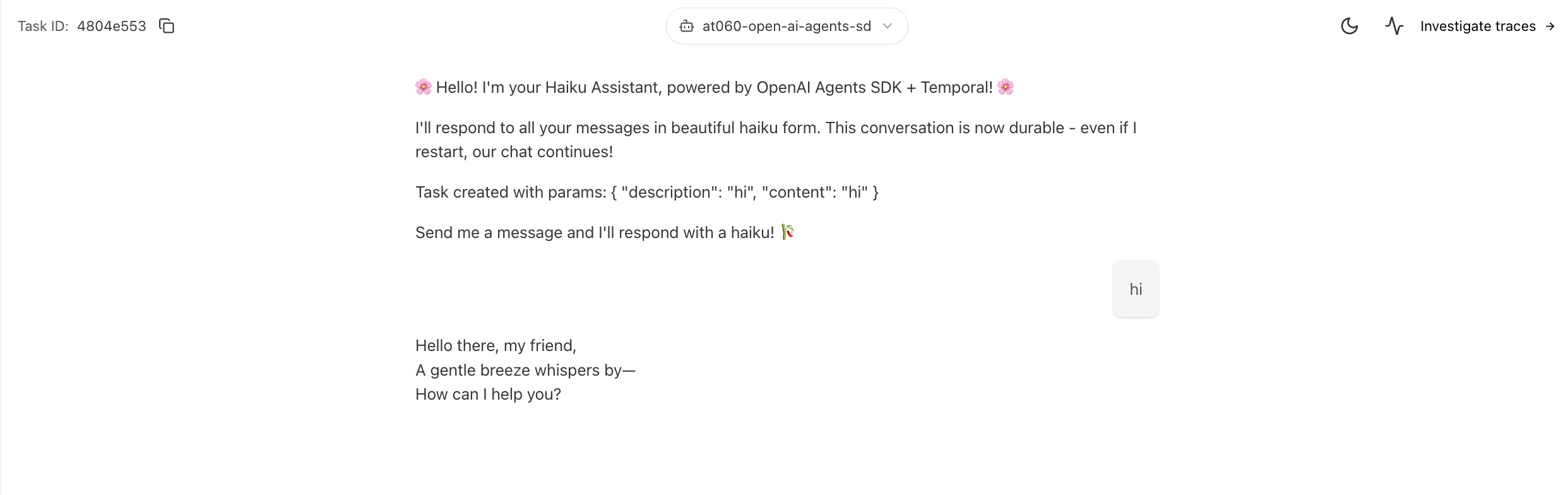
Agent Response:
Temporal UI - Automatic Activity:
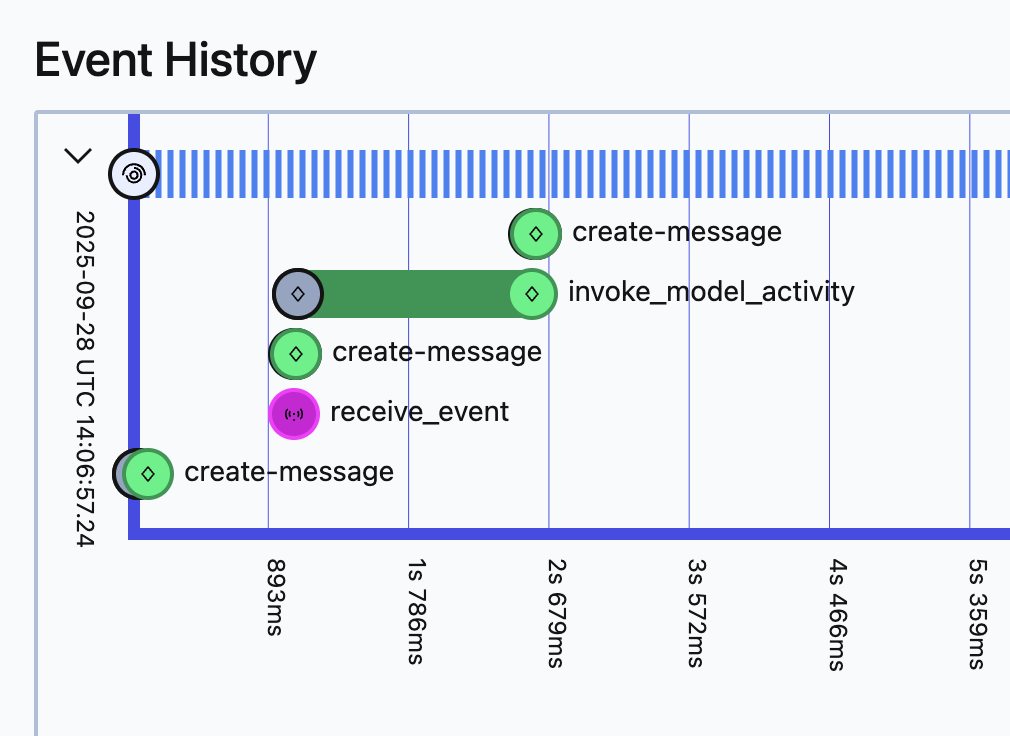
The invoke_model_activity is created automatically by the plugin, providing full observability.